Getting Familiar with Inline Grading

Did you know that myLesley has a new way to grade assignments? It’s called inline grading. Inline grading greatly streamlines the old grading process and best of all – it saves you time!

What is Inline Grading?

Inline grading allows instructors to view and grade submitted assignments directly in myLesley. You no longer need to download your students’ assignments to your computer to assess their work. Now you can view, annotate, and grade student work directly in your myLesley course.
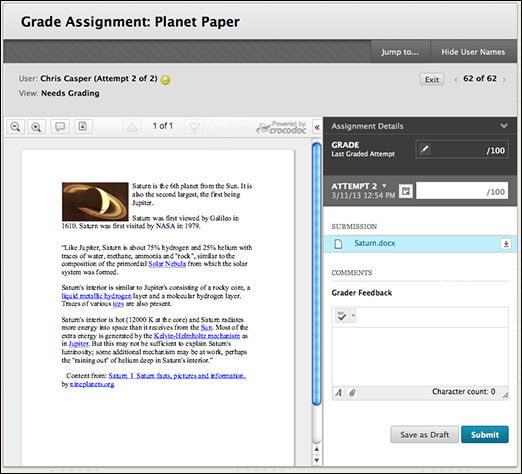
inline_grading_grade_assignment_page

How Does it Work?

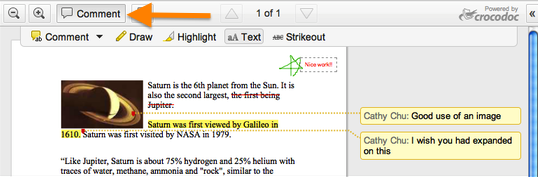
When you access a student’s submission in the Grade Center, myLesley will automatically load a preview of the submitted document. Simply click on the Comment button to open the annotation tools and interface.
annotation sample

Within the new grading interface you can create notes on specific areas of the document by highlighting sections of text and using the Comment button. The pencil tool can be used to draw in a freeform manner on the document as you might with a paper and pen offline.

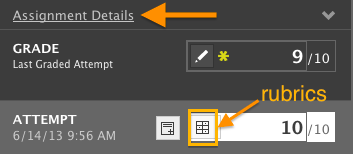
Click on the Assignment Details link in the right-hand sidebar to reference the assignment requirements. If you use the Rubric tool, you can access and use your rubric from the Attempt section.
AsgDetails2
If you wish to provide additional suggestions or notes outside of the submitted document, type your message to the student in the Grader Feedback area.

GraderFeedback

Once you have finished grading your student’s submission, you have the option of downloading a PDF version (with all your newly created annotations) which you can save for your records.

Inline grading works with PDF’s, Word documents, Powerpoints and Excel files. If a student submits a different type of file such as an image file, you will be prompted to download the file to your computer exactly as you have done in the past.

What Does This Mean For My Students?

Students can also view their annotated and graded assignment directly in myLesley. Their view is very similar to the instructor’s interface. Students can also view any additional feedback you may have provided and download the annotated PDF with all of your comments to save for their records.

Please note that there are no changes to the way students submit their assignments. Also, as before, they can view and retrieve their graded assignments in one of two ways: by going back to the original assignment location or by accessing the MyGrades area.

How Can I Learn More?

For more information on how to use inline grading in myLesley, check out this overview or view the video tutorial.


Ignite: An Innovative Approach to Presentations

ignitelogoThis summer, I was lucky enough to attend ASCD’s Leader to Leader (L2L) event on behalf of the Massachusetts affiliate of ASCD.  The purpose of the conference is to bring together affiliate leaders and members, building capacity and fostering collaboration.  During this event, ASCD staff and affiliate leaders shared Ignite sessions, which are, by definition, five-minute presentations that are comprised of 20 slides, each displayed for exactly 15 seconds. The slides move forward automatically, despite the presenter’s readiness, which creates a very quick, engaging, and dynamic atmosphere.  The slides often display visuals, as opposed to traditional text-based presentations.  The Ignite structure forces presenters to be succinct and clear, in addition to necessitating movement, energy, and preparedness. If you are interested in learning more, check out the history of Ignite events via Wikipedia or some additional information about what Ignite talks entail.

I also wanted to share with you the Ignite session presented by Massachusetts ASCD affiliate leader and alum of Lesley University’s Educational Technology Master’s program, Suzy Brooks. Suzy is a third grade teacher, in addition to serving as an EdTechTeacher consulting instructor.  Suzy created and shared an inspiring blog post about the experience of creating and sharing an Ignite session, describing each stage of the difficult and quite rewarding process.  Ignite talks can be an exciting vehicle to kick-off and set the tone for a class, meeting, or conference.

EdCamp Lesley is Coming this November!

edcamp_lesley_logoHave you heard of the “un-conference” movement that’s been spreading across the country and world since 2010? They are akin to a “collaborative conference,” where the conference attendees help to build and create the experience. EdCamps are ad-hoc “unconferences” organized by and for educators. In an article last fall, Justin Reich and Dan Callahan stated, “Edcamps are responsive to the needs of participating teachers, free to attend, inexpensive to host, free of vendor presence, and organized around the belief that attendees each have knowledge worth sharing.”

I have attended several EdCamps so far and made three primary observations. For starters, it is a marvelous movement that truly makes learning and professional development come alive when every attendee is empowered to offer their knowledge as opposed to being a passive participant. Secondly, a vast majority of first-time attendees often state that they wish more of their graduate education programs and district/school professional development offerings were as interactive, engaging, and timely. And lastly, as a former teacher and administrator in the Boston Public Schools, I did not see very many teachers from the local city schools participating in this movement.

So, we are going to host our own EdCamp here at Lesley on Saturday, November 2nd. It is free to attend and we are encouraging faculty, students, alumni, and other educators to attend. The morning will start off with some informal networking and we will all “build the agenda” together. I know it sounds quite frightening, but it truly is a wonderful experience. You can learn more about the EdCamp model via the EdCamp Foundation or the EdCamp wiki. There are also several videos online that can provide more context.

You can register today to reserve your seat at: https://www.lesleyelis.com/edcamplesley.

If you have any questions, please don’t hesitate to contact me.

The New myLesley Calendar is Here

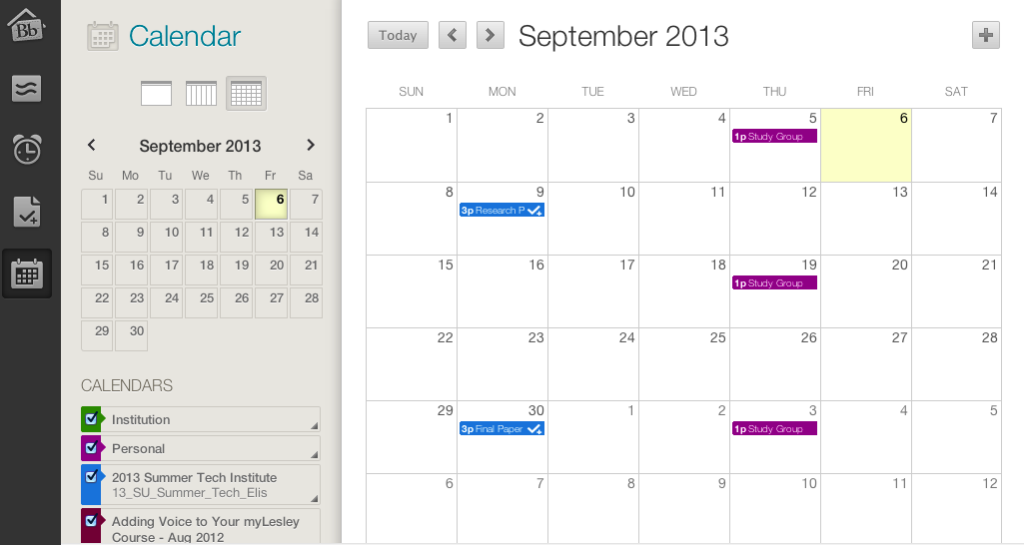
myLesley has a brand new calendar tool. Not only does it have a more modern look and functionality, but now you can personalize and customize it to your needs.

myLesley calendar

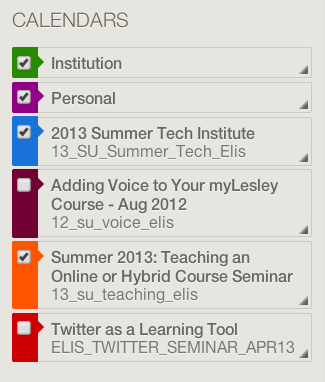
View calendar events by day, week or month and view all course calendars at once. Select which calendars you want to view and color code calendars to quickly identify personal, course or university items.

calendar_list

Instructors can easily create new events for their courses and both instructors and students can add personal events. Course assignments with due dates will automatically appear on the calendar.

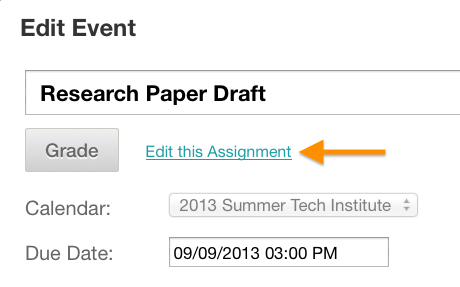
Need to edit an event? Simply click on the event to open it or drag and drop it to the new date. Instructors can change assignment due dates in the calendar making it easy to update your course for the new semester. Need to update the assignment details. Just click on ‘Edit this Assignment’ and go directly to the assignment.

calendar_asg

Do you use Google calendar for your personal events? Export your myLesley calendar to Google or other calendar tool and have everything in one place.

calendar_extlink

You can access the new calendar in two ways:

Click on your name in the top right corner and then click on the calendar icon…

calendar_access
… or click on Tools in any myLesley course menu and then click on Calendar.

calendar_toolicon

For more information on how to use the new calendar tool, watch the video tutorial below or check out the handy step-by-step overview.

Engaging Learners in the Real World: Field Observations

McDonalds

Students often spend much of their time in classes talking about the content of their courses rather than applying that content. Moving students more quickly towards applying content in authentic ways can enhance and strengthen students’ understanding of concepts and ideas – something that can be difficult through abstract discourse.

If you would like your students to learn through application, field observations can be a very effective way to bring the real world into the classroom.  In his fully online course Introduction to Sociology, Netra Darai uses several “Participant Observations” in which students go out into their local communities to study a particular topic, and report and discuss their experiences with their classmates via a blog.  In a unit on social class, his students speak to staff members of organizations supporting the homeless. In a unit on gender and age, they interview an elderly person they know.

In her hybrid course, Cross Cultural Psychology, which meets face-to-face once per week, Katie Howe uses similar field observations. For example, in a unit on McDonaldization, her students visit popular chain stores, restaurants or local sporting events to examine how such establishments follow principles of McDonaldization (efficiency, calculability, predictability, and control).  Students then present a brief report on their observations in class.

If you would like assistance with crafting such assignments for your course, feel free to contact the instructional designers on the eLearning team or contact us at elis@lesley.edu.

Note: The image above is licensed under the Creative Commons Attribution 3.0 Unported license.