The Horizon Report looks at the five year horizon for emerging trends and technologies that will impact higher education. Which of these will drive changes in education? What at the major challenges higher education institutions are facing and how can we strategize solutions?
The Horizon Report is a collaborative research project from the New Media Consortium (NMC) and the EDUCAUSE Learning Initiative (ELI). It looks at the six key trends, six significant challenges, and six important developments in educational technology. All of the topics were selected by an expert panel with a range of backgrounds and perspectives. The report is intended to be a reference that educators can use to plan for technology, not a solution.
In today’s episode, Agent L once again saves the day … and Ben Friday’s sanity. Read on and learn how to update all the due dates in your myLesley course.
Agent L: Hi, Ben. What’s going on? I thought we got all the syllabi updated.
Ben Friday: We did, Agent L, but now we need to update all the assignment due dates. The new semester is starting in a few days and all the dates are for last semester. We have to go to each assignment and fix the due date.
Agent L: Oh, Ben. You do know you can update ALL the dates in one place, right?
Ben: What?!? How? Where?
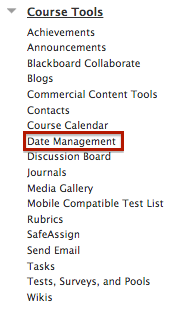
Agent L: It’s called the Date Management tool and you can find it in the Control Panel. It’s part of the Course Tools section.
You have three options for updating the dates.
You can use the course start date to adjust all the dates in the course based on the date your course starts. For example, if your original course started on January 1st and you had a paper due on January 10th, that’s 9 days after your course start date. If your new course starts on February 29th, entering your course start date will adjust the paper’s due date to March 9th or 9 days after the new course start date.
You can also select to adjust by number of days. This will shift all the dates by the number of days you enter. If you enter 30 days, then your all your course dates will shift by that many days. The paper due on January 10th, will now be due on February 9th. This one might require a little math, but is a good option if know the exact number of days you need to shift dates.
The third option is to list all dates for review. This option will display all the existing dates in your course and allow you to adjust them manually. This is a good option if you already have all the dates in your syllabus or made some adjustments in your course assignments. You will still need to adjust each date manually, but you can do it all in one place rather than navigating to each dated item in the course.
Ben: That’s brilliant, Agent L! This is going to save us soooo much time. I’ll let everyone know. See you later.
Agent L: Ummm… Ben? What about that coffee? … Maybe next time.
Blackboard’s Bb Grader app allows faculty to grade Blackboard Assignments while on the go from their iPad. Just take a look at a few of the features:
View all assignments submitted to the Assignment tool from all of your courses.
Grade and annotate PDF, Word, Powerpoint, JPG, PNG and HTML files directly in the app.
Use assessment rubrics
Provide text, audio and video feedback to students
Return graded assignments to students as you complete each one or all at once
It may just become your preferred way to grade. Bb Grader is iPad only. Sorry Android and iPhone users. Check out Bb Grader in action in the video below.
What is OER?
The Hewelett Foundation defines Open Educational Resources as: “teaching, learning and research resources that reside in the public domain or have been released under an intellectual property license that permits free use and repurposing by others.”
OER may include textbooks, videos, tests and assessments, software, course content and even full courses. These materials are shared under Creative Commons licensing which allows the content to be freely used, copied, and remixable. The goal is have content that is free of barriers to access and sharing for educational use.
Why do I care about OER?
Textbooks are expensive. Using OER instead of publisher content that students must purchase makes education more affordable. OER gives you freedom to decide what to teach when in your course. Simply plan your course and then look for the resources to support your content and assignments rather than following the textbook structure. OER are just as good, and sometimes better, than publisher content.
Why isn’t everyone using OER?
In a 2014 survey, most faculty were unaware of OER. Those who were aware were deterred by the lack of search tools. Locating appropriate resources took too much time and energy. Fortunately, the lack of search tools is changing. Over the last decade several OER repositories and search tools have appeared to curate all this incredibly useful content.
On January 20, Sadie Anderson from VoiceThread conducted a training webinar for Lesley faculty, focusing on peer review and the advanced commenting features now available in VoiceThread. A recording of the webinar is below.
Want to learn more about using VoiceThread in your course? Sign up for one of VoiceThread’s free online workshops or view a recording from a past workshop: https://voicethread.com/workshops