Faculty Development Community at Lesley

A new faculty community has been created in myLesley as a central place to share information and events from the Dean of Faculty Office and eLearning and Instructional Support. The community is still a work in progress so if there’s content you want to see and would find helpful please let us know.

A key element of the Faculty Development community will be events calendar. The calendar will list events sponsored by the Center for Teaching, Learning and Scholarship, eLearning and Instructional Support, Faculty Development and the Provost Office. We will also post relevant events by other Lesley offices.

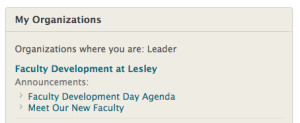
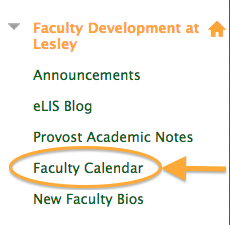
To access the Faculty Development at Lesley community, log into myLesley. Click on the “my community” tab at the top. Look for Faculty Development at Lesley in the list and click on the title.my organizations To access the events calendar, click on Faculty Calendar in the left-hand menu.faculty calendar link
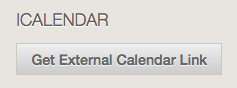
Want to add the Faculty Development calendar to your own calendar such as Outlook, Office 365, Google, or your iOS or Android phone? Simply scroll to the bottom of the myLeslsy calendar and click Get External Calendar Link. get external link
Copy the link for the myLesley calendar and add it to your personal calendar. See the instructions on our support site to learn how to add the calendar link to many of the most popular calendar tools.


Using Announcements to Communicate With Your Students

In this episode, Agent L aids faculty to outsmart Gremlins in the System (aka GITS) and get students to their first day of class.

ben fridayBen Friday: Agent L, you have a new mission. GITS have struck again. They have managed to rearrange all the room scheduling. Classes start next week and the faculty are in a bit of a pickle. They need to contact their students as soon as possible with the new room locations. How will you handle this? Will you go undercover as a GITS agent? Maybe reprogram their systems? What about…?agent L

Agent L: Wait… Ben, have you heard of Announcements?

Ben Friday: Announcements? What’s that? Some new fiendish plot from GITS?

Agent L: Announcements is a tool in myLesley. Faculty can easily send out timely information to their students whenever they need to. Simply log into your myLesley course and click the Create Announcement button.
create announcement


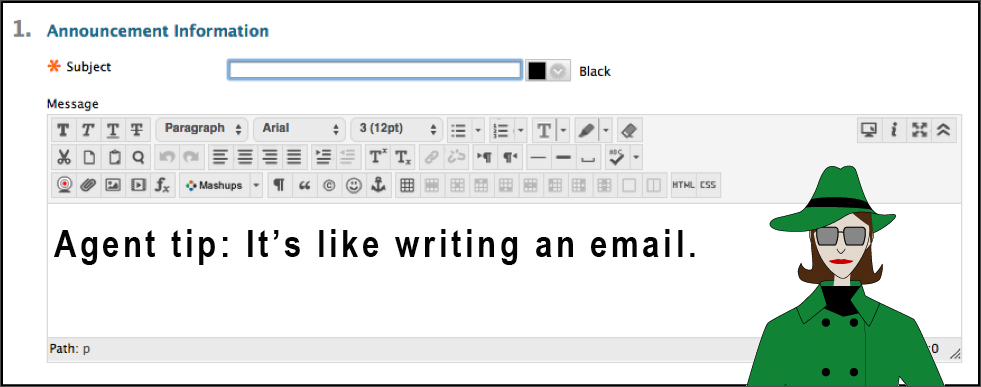
Type in a Subject for your Announcement and the Message.
create an announcement

Ben Friday: But what if the students don’t log into the course site between now and class time?

Agent L: Announcements can be emailed to them. The instructors don’t even need to know the students’ email addresses. Just scroll below the Message area to the Web Announcement Options section and check the Email Announcement box.
email announcement

Click Submit and every member of the course will now have a copy in their inbox.

Ben Friday: That’s brilliant Agent L. I’ll spread the word.

Agent L: Maybe via an Announcement (smirk).

Check back for Agent L’s next exciting mission. For more information on how to use Announcements, see the instructions on the Agent Support site or view the video below.

Getting Ready for a New Semester

The Fall semester is fast approaching and there is so much to do. Below are a few reminders and tips from our instructional design team to smooth the way and get off to a great start.

Before Your Course Begins:

Personalize Your Course: Consider which aspects of the course you want to adjust.  At minimum, this should include parts of the syllabus (your contact information, for example). If necessary, contact eLIS or use our online tutorials to learn about Blackboard editing tools.

Review and update information as necessary in the syllabus that sets expectations for communication, group work, or instructor facilitation. For example, will the pre-established turn-around times for feedback work with your schedule? Keep in mind that changes you make in the syllabus might need to be checked against content you entered into myLesley to make sure the instructions align in both locations.

Set Up a Teaching Schedule: Consider setting up a teaching schedule to better organize your teaching time.  A schedule can help you to identify when to attend to different facilitation tasks (i.e. weekly announcements, daily discussion board check-ins, major project or paper feedback, etc.).

Familiarize Yourself with These Tools:
Performance Dashboard: Use this tool to quickly view if and when students are accessing the course.
performance dashboard

Announcements Tool: Recommendations for using this tool include:

  • Always make sure to send Announcements as emails. Embedded images, video, or audio will NOT be available to students in emails.
    emailannouncement
  • Use the Announcement Tool for:
    1. Welcome messages, briefly introducing yourself and the course
    2. Introducing a new week and wrapping up a previous week
    3. Providing whole-class feedback on discussions, group work, etc.
    4. Updating students on changes to the course or assignment scheduling
    5. Clarifying any confusion that multiple students have experienced

Post a Welcome Announcement: In addition to welcoming students to the course, you might point out the syllabus and other key documents to review before beginning the first module.

Taking care of these seemingly small things now can greatly help you stay organized and in contact with your students as you move through the course.

myLesley Upgrade in August 2015

myLesley is being upgraded to the latest version of Blackboard (Blackboard Learn 9.1 October 2014 Release). The upgrade will begin at 5:00 PM on Wednesday, August 26th and will last until the morning of Friday, August 28th.

What does this mean to you?
During the upgrade, you will not be able access to myLesley. However, LOIS, email, and other Lesley systems will remain available and unaffected.

What’s changing in myLesley?
There will be no major changes to myLesley with this upgrade which means no new tools to learn how to use. Instead, this upgrade is intended to fix minor errors and improve the overall performance of the system.

Should I do anything to prepare?
It’s always a good idea to have a backup of your course materials. You may wish to archive your course(s) prior to the upgrade just in case. You can find instructions for doing this on the Lesley Support site.

We also recommend that you closely review your course content after the upgrade to ensure everything is behaving as intended.

We don’t expect any issues, but it’s good to be prepared.

For the most recent information on the upgrade, please check the myLesley Upgrade page at: http://tinyurl.com/myLesleyUpgrade