Accessibility Essentials Webinar – Tips and Tricks for All Instructors

Join us Thursday, March 31, 12:00 noon for an online lunch and learn about web accessibility.  Get up to speed with your colleagues on one the most important topics in online education today.  

This one-hour webinar will walk through small and simple adjustments that improve the accessibility and usability of our courses. You’ll hear about proactive changes you can make that not only help reduce barriers to learning for those who struggle, but can also create better learning experiences for all students.

Led by members of eLIS, this practical session will cover the most-discussed topics identified as accessibility obstacles (links, images, documents/PDFs, content organization, videos) and provide accompanying tutorials demonstrating the simple ways we can increase accessibility.

To access the webinar, use this guest link

Emails Blocked from myLesley

Gremlins in the System (GITS) is at it again. This time they are blocking communications sent from myLesley in hopes of disrupting eLearning. Will Agent L be able to outsmart them? Read on and find out.

ALvsGITS

Agent L: Hi Ben. Do you have time for a cup of coffee?

Ben Friday: Not today, Agent L. GITS are at it again. They are blocking emails sent from myLesley. No one is getting their messages. It’s a disaster!

Agent L: Calm down, Ben. Tell me what’s happening.

Ben: GITS has changed the email address that all the myLesley course emails are sent from. They are now coming from do-not-reply@blackboard.com except not everyone is getting them.

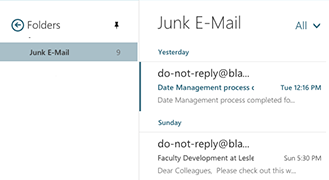
Agent L: Let’s take a look at your email. It must be there somewhere. Here they are. All the emails are in your Junk Email folder. Basically your email application thinks the emails are spam.
junk email folder

Ben: So what do I do?

Agent L: Simple. We tell Office 365 that they emails are ok.
(Agent tip: Go to lesley.edu/email to access Office 365 with your Lesley email address and password.)

From within Office 365, click on the gear icon in the top right corner. Settingsicon

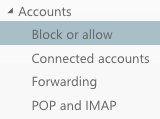
Choose Options from the menu. Then click Block or allow in the left-hand menu.
blockAllow

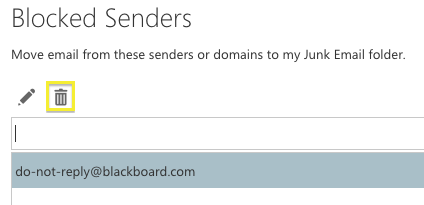
Click on do-not-reply@blackboard.com to select it and click the trash can icon to remove it from the list.
Blockedsenders

Click Save at the top to save your options and you’re all set. Emails from myLesley will now go to your Inbox instead of your Junk Email folder.

BenBen: Wow, Agent L! Way to outsmart GITS!

agent LAgent L: Outsmarting GITS isn’t just my mission, Ben. It’s my passion.
 

Learn more about using myLesley and Office 365 at the Agent Support Site.

Read Internet Articles Offline

Do you have a long list of internet articles you want to read?
Do you have no time to read them right now?
Do you have a long commute but your iPad or Android tablet can’t access the internet when you’re on the bus?

Have you heard about Pocket? No? Well, it might just be the answer to your problem.

Pocket is free app for your computer, cell phone and tablet that will let you save all those articles to read later. Your saved articles will be synced across all your devices so your saved articles are available where and when you want them. No wifi needed.

pocket app

Image from engadget.com

Download the app to your device and install the extension for your browser. Then when you discover an article you want to read later, simply click the button to save it. It will be waiting for you when you’re ready. You can also tag articles to organize them by topic and  listen to the articles using text-to-speech.

Go to https://getpocket.com/ create your account and get started.

An LMS Review at Lesley

The Digital Experience Committee and Teaching and Learning with Technology (TLTech) Committee are currently conducting an LMS Review. Lesley University has been using Blackboard as our learning management system (LMS) since 2005. During this time LMS’s and elearning have changed dramatically. In July 2015, Blackboard released a brand new version of its LMS called Blackboard Ultra. Blackboard Ultra is a major redesign compared to the current version of Blackboard. Since moving to this version would be such a big change, it seemed worthwhile to revisit the LMS market to determine if another LMS would better fit the needs of Lesley University and its faculty and students.

How We Use the LMS (Blackboard):
Lesley uses the LMS as the primary classroom venue for fully online courses and to enhance face-to-face courses, allowing for students to submit assignments, collaborate together outside of class, and to bring outside resources into the classroom.

The LMS Options Currently Under Review:
The Digital Experience Committee scheduled demos with:

The review committee also looked at Haiku and decided to eliminate them from further consideration after the initial vendor demo. Pearson and MoodleRooms were also given brief consideration, but demos were not scheduled with these vendors as they did not seem to fit our needs.

Blackboard Ultra is not yet ready for us to do a full review of its platform. We are, therefore, reviewing Blackboard’s Software as a Service (SaaS) options. This would allow us to keep our current version of Blackboard/myLesley while moving to a cloud-based model that would allow for continuous maintenance with little to no downtime for upgrades.

After reviewing detailed descriptions of each of the Learning Management Systems in the TL Tech committee, a smaller subcommittee of faculty was selected to decide which vendors should provide demonstrations to the entire campus. This faculty subcommitee is currently reviewing and testing these options. We are also in the process of scheduling on-campus vendor-led demos of the systems of most interest to faculty. Keep an eye on this blog and announcements from Faculty Development at Lesley for dates and opportunities to participate. Contact elis@lesley.edu with questions and comments.

Apply to the 2016 Summer Technology Institute

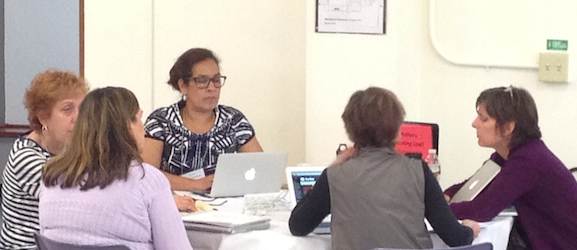
STI2015Join your Lesley faculty colleagues for an exciting, immersive professional development opportunity!

The Summer Technology Institute is an opportunity for faculty to participate in a learning community across disciplines and schools engaged in an exploration of the effective uses of technology in teaching, learning, collaboration, and scholarship. This event is sponsored by the Office of the Provost and the Center for Teaching, Learning and Scholarship, and organized by eLearning and Instructional Support. To apply for the Summer Tech Institute, please complete the brief application form here.

All faculty — core or adjunct — are welcome to apply.  Faculty who consider themselves basic technology users or who do not currently use technology in their teaching are especially encouraged to apply. Faculty selected through the application process receive a $500 stipend for participation in the institute.

The program features a 4-day institute in June, held on the Brattle Campus. Faculty engage in a rich mix of dialogue, hands-on practice, project-based learning, reflection, and application to explore innovative ways technology can be integrated into their teaching. 

Examples of workshops from past Summer Tech Institutes include:

  • Navigating the Technology Wilderness
  • Designing for Engagement
  • OneDrive: Collaboration Made Easy
  • Blackboard Beautification Project
  • Designing and Facilitating Online Discussions
  • Introducing Media Into Your Blackboard Course

Expectations for Summer Technology Institute Participants

Faculty are expected to:

  • Participate in all four days of the institute: June 13-16, 2016
  • Develop a technology-enhanced learning activity for a 2016-2017 course
  • Attend or participate in at least one professional development outreach activity during the 2016-17 school year

Important Dates

March 25, 2016 Applications Due
April 8, 2016 Participants Announced
June 13-16, 2016 Summer Institute

Application

To apply for the Summer Technology Institute, please fill out the 2016 application form.